Free Google review QR code for your business
Create a direct link, QR image and printable review card without requiring a customer rating first.
Send the scan straight to Google
Use your correct Google Place ID so the link refers to your own business. Avoid a satisfaction screen between the QR scan and the public review route.
Make it easy to scan
Print with strong contrast, enough clear space around the code and a size suitable for the viewing distance. Test the final print on more than one phone.
Ask without pressure
Use “Share your experience on Google”. Let customers choose whether and when to review. Do not offer rewards or ask staff to insist on a review while the customer is present.
Start with your current position
Use the free reputation audit to review the figures you already have. Then explore the relevant tool or workflow and compare Free with Pro.
Questions to check during your free trial
- Can I keep the public review option available to every customer?
- Which connections, permissions and usage limits apply to my account?
- How can I stop messaging, export my data and end the service?
Sources: Google review policy; ICO electronic mail guidance.
Free Google review QR code template
Use the free link, QR and card generator to create a card with your business name and a QR code for your Google profile. You can download the code as PNG or SVG, or use the printable card’s Print / save as PDF button. No design subscription or account is required.
Counter card wording
Your feedback matters.
Share your honest experience.
Scan to leave us a review on Google.
Receipt or invoice wording
Thank you for choosing [Business].
Would you like to share your experience?
Scan the QR code to review us on Google.
Both are optional invitations for all customers. Replace the business name and generate the QR for your own location; these examples are not testimonials.
How to print a Google review QR code
- Enter your business name and Place ID in the generator.
- Scan the generated code and confirm the destination.
- Choose SVG for a design layout, PNG for quick use, or Print / save as PDF for the ready-made card.
- Keep the whole code and its surrounding white space visible. Do not stretch, crop or place text over it.
- Print a sample at the intended size and test it on more than one phone before producing a batch.
Where should I put the card?
Choose a place where a customer can read and scan comfortably, such as a counter or a receipt. Keep participation optional and allow customers to review later on their own device.
Does the QR code expire?
The downloadable code contains the generated link, without a paid redirect subscription. It will still depend on that destination remaining valid. Check it again if your business profile changes.
For digital invitations, see email and SMS request templates. To assess your current feedback routine, run your free reputation audit.
Start getting more Google reviews
No card required · Set up in 5 minutes · Cancel anytime
Three free printable designs, personalised for your business
Enter your business name and Place ID in the generator. After generating, download any of these SVG designs with your own QR code. There is no signup or design subscription.
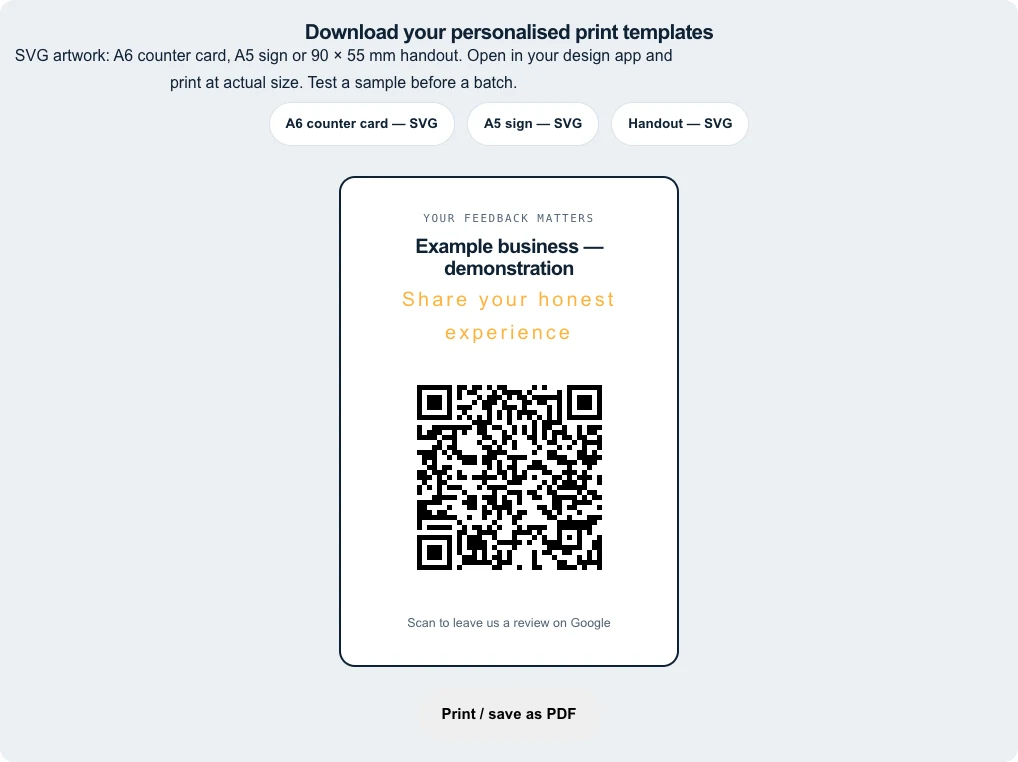
- A6 counter card — 105 × 148 mm: portrait card with a 64 mm QR area, including its white margin.
- A5 sign — 148 × 210 mm: larger portrait design with a 90 mm QR area for a counter or noticeboard.
- Handout — 90 × 55 mm: landscape card with a 38 mm QR area and a short invitation beside it.
Use the existing Print / save as PDF button for the browser’s printable card. The three SVG downloads preserve their physical dimensions; open them in an SVG-compatible design app to print or export as PDF.
QR sizes and print settings
For a receipt or an invoice, try a QR area of at least 35–40 mm including the white margin as a starting point for close-up scanning. This is a practical starting size, not a guarantee: longer links, printers, lighting and phones affect readability. For signs read from farther away, use a larger code and test from the actual viewing position.
- Print at 100% / actual size. Disable “Fit to page” if it would change the chosen dimensions.
- Use black modules on white. Preserve at least four modules of clear white space on every side. Our downloads include this margin.
- Choose SVG for scalable artwork. Avoid enlarging a small PNG or compressing it in a messaging app before printing.
- Keep the QR flat and clear of folds, trim lines, logos and glossy glare.
- Test a physical sample on at least two phones, in the intended lighting, before ordering a batch.
The four-module margin follows DENSO WAVE’s QR code guidance. Never remove this white area to make the code fit.